
RMA 申請流程
If you would like to return your flash memory, DRAM or EP module for maintenance, a return merchandise authorization (RMA) code must first be assigned to you before you can return your product to Innodisk. Please apply for an RMA number according to the process tree below. Although both ways are acceptable, the MyInnodisk option will be expedited slightly faster. If you currently do not have a MyInnodisk account, please contact your Innodisk account manager.
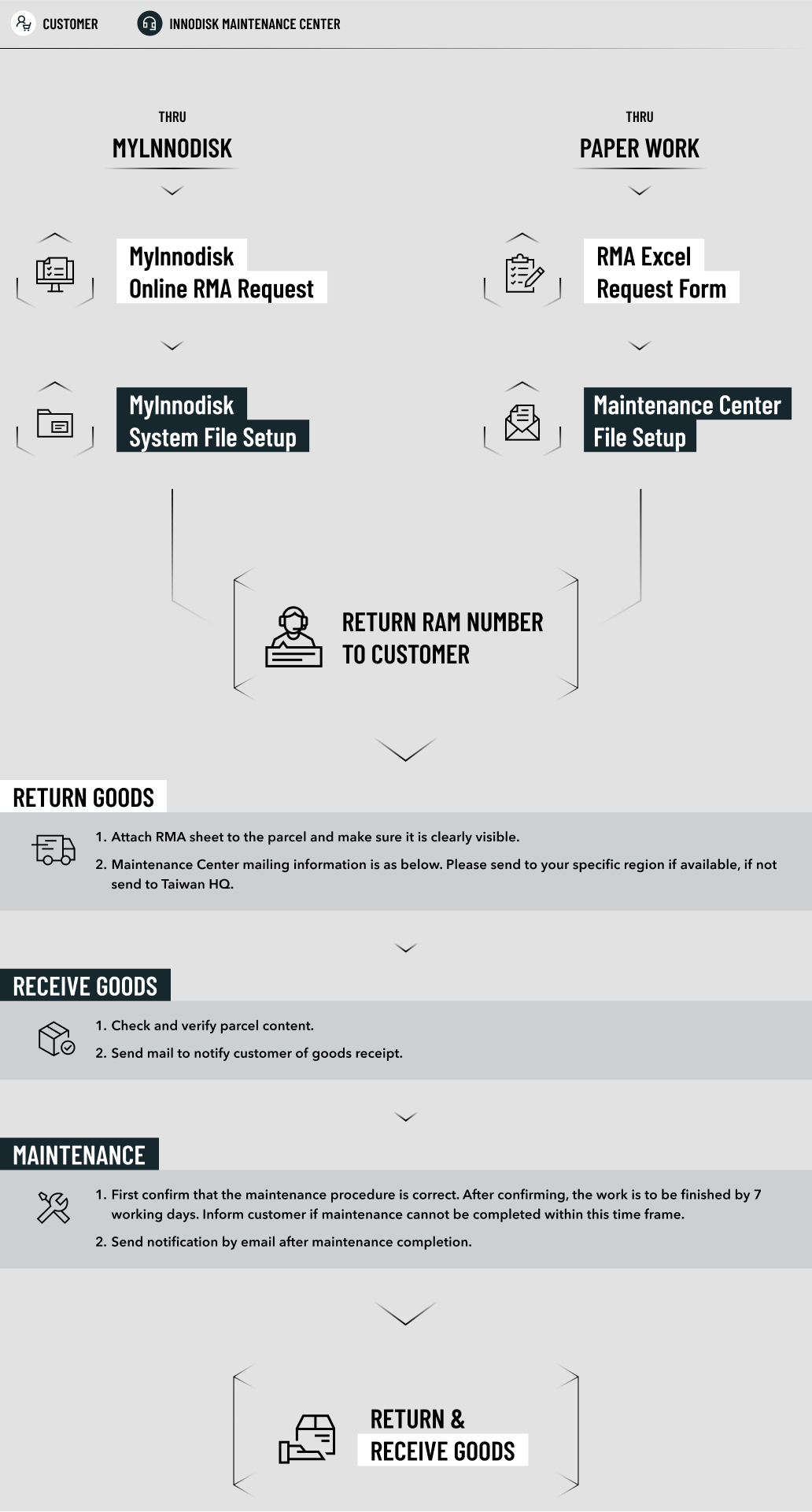
申請 RMA
There are two methods of applying for an RMA:
Online RMA Application
Log in to your MyInnodisk account, from there you will be able to access the RMA application page. Follow the instructions of the RMA application and acquire your RMA authorization code. Securely package your product with the application form attached visibly to the outside and send to our maintenance center. *MyInnodisk is only for Innodisk’s customers. If you want to apply for an account, please ask your Innodisk sales representative.
Download RMA application form
Please fill in the RMA application form and provide product model, quantity and product status. E-mail to Innodisk maintenance center (rma@innodisk.com). After confirming your application, an RMA number will be provided. Please complete the RMA application form with contact information and address and attached the form to the package. Please send the product to the Innodisk maintenance center within 14 days after receiving the RMA authorization code. Shipping and insurance fee are paid by the customer.
宜鼎 RMA 服務中心
Headquarters RMA CENTER
4F., No.237, Sec. 1, Datong Rd., Xizhi Dist., New Taipei City 221, Taiwan
Tel: +886-2-7703-3000 Ext: 5114
Fax: +886-2-7703-3555
E-mail: rma@innodisk.com
USA RMA CENTER
42996 Osgood Road, Fremont, CA 94539 USA
Tel: +1-510-770-9421 Ext: 335
Fax: +1-510-770-9424
E-mail: rma_usa@innodisk.com
CHINA RMA CENTER
807, 8 Floor, Building B ,Hengyue Center, Dengliang Road, Nanshan District, Shenzhen
Tel: +86-755-2167-3689 / +86-755-2167-3690 Ext: 617
Fax: +86-755-2167-3691
E-mail: rma_cn@innodisk.com
RMA 常見問題
1. 如何判斷產品是否在保固內?
產品保固年限請參考官網內的保固條款。如需要查詢產品保固區間,請至 保固頁面 進行查詢。
2. 產品過保固期限後,維修費用如何計算?
依照不良狀況更換的材料費+NT$200檢測費。
3. RMA申請方式?
申請方式有兩種選擇:
(1) MyInnodisk平台線上RMA申請
透過登入 MyInnodisk 帳號,進入RMA申請畫面,依其網站指示步驟完成維修申請,並取得RMA授權號碼,請將產品妥善包裝,並將維修RMA申請單貼在包裝外部,寄至宜鼎國際維修中心。宜鼎國際維修中心收到維修品後,會立即為您提供服務。(MyInnodisk需為Innodisk客戶才可使用,如果您需要開啟帳號,請詢問您在Innodisk的業務窗口)
(2)下載RMA申請單並填寫完成
請填寫RAM申請單(參考RMA流程),告知產品型號、數量及故障狀況,以電子郵件向宜鼎國際客服中心報修(rma@innodisk.com),經維修部確認後,通知您維修RMA授權號碼。取得授權號碼後,請確實填妥RMA需求申請單(詳細聯絡方式與地址),將維修RMA申請單貼在包裝外部,並妥善包裝以避免運送時的損害。維修品請於接獲RMA授權號碼後14天內,自付運費及保險,寄達宜鼎國際維修中心。宜鼎國際維修中心收到維修品後,會立即為您提供服務。
4. RMA完修返回後還是有相同問題,該如何處理?
由於RMA返還客戶前已經過正常測試,若是客戶收到還是有問題,建議請客戶轉送FAE分析,確認是否為相容性問題。
5. 已付費維修過之產品保固怎麼算?
付費維修完後對付費零件提供六個月人工及零件免費保固,若為不同維修內容則依實際不良狀況再次報價。
6. 金手指焦黑為什麼算是人為因素損壞?
Innodisk每一支記憶體於出廠前,都會實際進行插板燒機測試,因此若是產品本身不良,會於廠內測試時就導致燒板狀況。又金手指焦黑往往是因插拔方式不正確,或者主機板插槽內有異物而造成的短路金手指燒毀,這些都屬人為因素導致,並非產品不良。
7. 產品若不是向Innodisk公司直接購買或不是Innodisk的直屬客戶,不良品該如何送修?
請透過原來購買管道詢問,由原賣方向Innodisk提出RMA申請。